Create Port Infrastructure Illustrations
Port infrastructure includes many connected areas and facilities. These can include berths, docks, storage areas, roads, cranes, pipelines, warehouses, and terminals. Icograms Designer helps you bring these elements together in a clear port layout. You can arrange buildings, vessels, vehicles, containers, equipment, and other objects on a single visual canvas.Use a port infrastructure illustration to present a new facility, explain an existing site, or support a planning project. You can also create simplified diagrams when you want to focus on the main processes. A visual terminal layout can show how different areas connect. This makes complex information easier to understand for customers, employees, students, and other audiences.
Visualize Different Types of Terminals
Different terminals have different facilities, equipment, and workflows. A well-designed illustration can help you explain these differences quickly.Oil terminal can include storage tanks, pipelines, loading facilities, ships, and supporting infrastructure. You can combine these elements into a clear maritime illustration.
LNG terminal often requires specialized facilities for receiving, storing, and transferring liquefied natural gas. Create a visual diagram to explain the main components and connections.
LPG terminal can be illustrated with storage tanks, pipelines, vessels, loading areas, and safety infrastructure. Use icons and simple connections to make the process easier to follow.
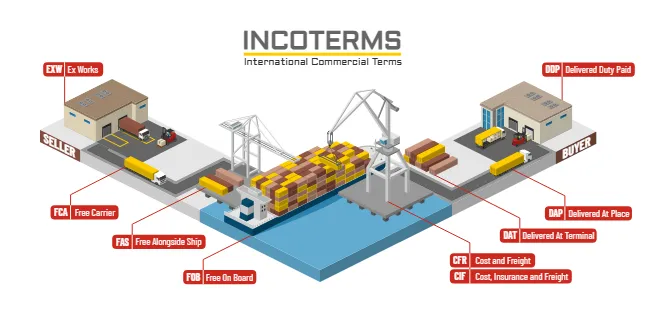
You can also create illustrations for container terminals and general cargo facilities. Show containers, cranes, trucks, ships, warehouses, and other equipment in a single port layout.
Explain Maritime Logistics and the Port Supply Chain
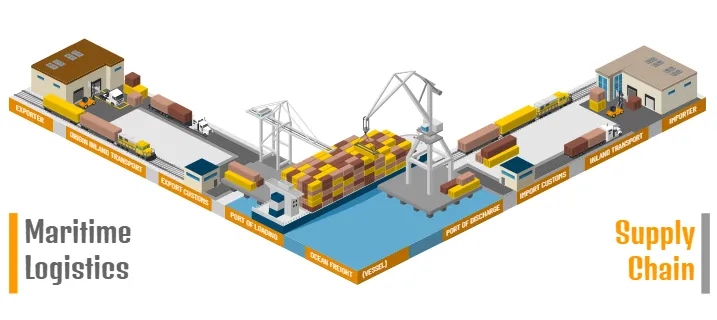
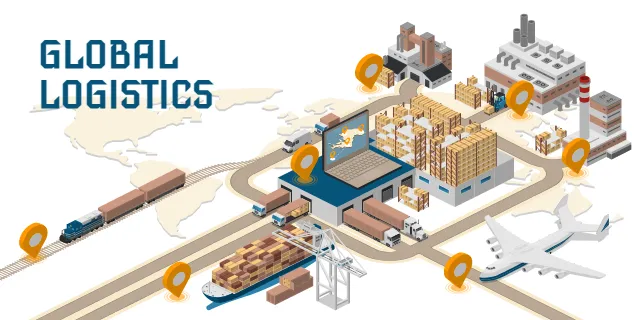
Ports play an important role in global logistics. Cargo moves between ships, terminals, storage areas, trucks, trains, and distribution centers. A port supply chain diagram can help you explain this movement from one stage to another. Use arrows, roads, vehicles, containers, and facilities to create an easy-to-follow visual story. You can illustrate how cargo arrives at a port and moves through different terminal areas. Show loading, unloading, storage, transportation, and distribution processes. These visuals are useful for logistics presentations, training materials, websites, reports, and educational content. Instead of explaining every step with text, you can show the entire process in one illustration.
Create Port Security and Technology Diagrams
Modern ports rely on technology to manage operations and improve port security. Cameras, control centers, access points, sensors, communication systems, and monitoring equipment can all play a role. With Icograms Designer, you can combine these elements into a port security diagram. Show important security areas and explain how different systems work together.You can also create maritime diagrams for navigation, vessel tracking, communication, and port operations. Use visual connections to show relationships between different systems and facilities. This approach works especially well when complex technical information needs to be presented to a broader audience.
Design Clear Port Layouts and Infographics
A good port layout does not need to show every detail. Sometimes a simplified illustration communicates an idea more effectively. Start with the main infrastructure and add the elements that matter most. You can then customize the size, position, labels, and other visual details. Icograms Designer gives you the flexibility to create everything from simple diagrams to detailed maritime infographics. Combine buildings, ships, roads, cargo, containers, vehicles, and equipment to create your own scene. You can also use different views and compositions to highlight specific areas. For example, focus on a terminal entrance, cargo storage area, loading zone, or security facility.
Create Your Maritime Illustration with Icograms Designer
Creating a professional port infrastructure illustration does not have to be complicated. Icograms Designer gives you a visual toolkit for building detailed maritime scenes. Its drag-and-drop workflow makes it easy to arrange maritime elements on the canvas. You can customize your design and adapt it to your project.Create an oil terminal, LNG terminal, LPG terminal, container terminal, or general port layout. Visualize logistics processes, cargo movement, port security, and the wider port supply chain. You can use your finished illustration, diagram, or infographic for presentations, websites, reports, training materials, and marketing content.
Explore the maritime design possibilities with Icograms Designer and turn complex port infrastructure into clear, engaging visuals.